Why Track Trends?
A single scan gives you a snapshot. But tracking trends over time tells you whether your AI visibility is improving, declining, or staying steady. This is essential for understanding the impact of changes to your online presence.
The Trends Dashboard
After running two or more scans, AI Biz Wiz automatically generates trend visualizations on your brand's detail page.
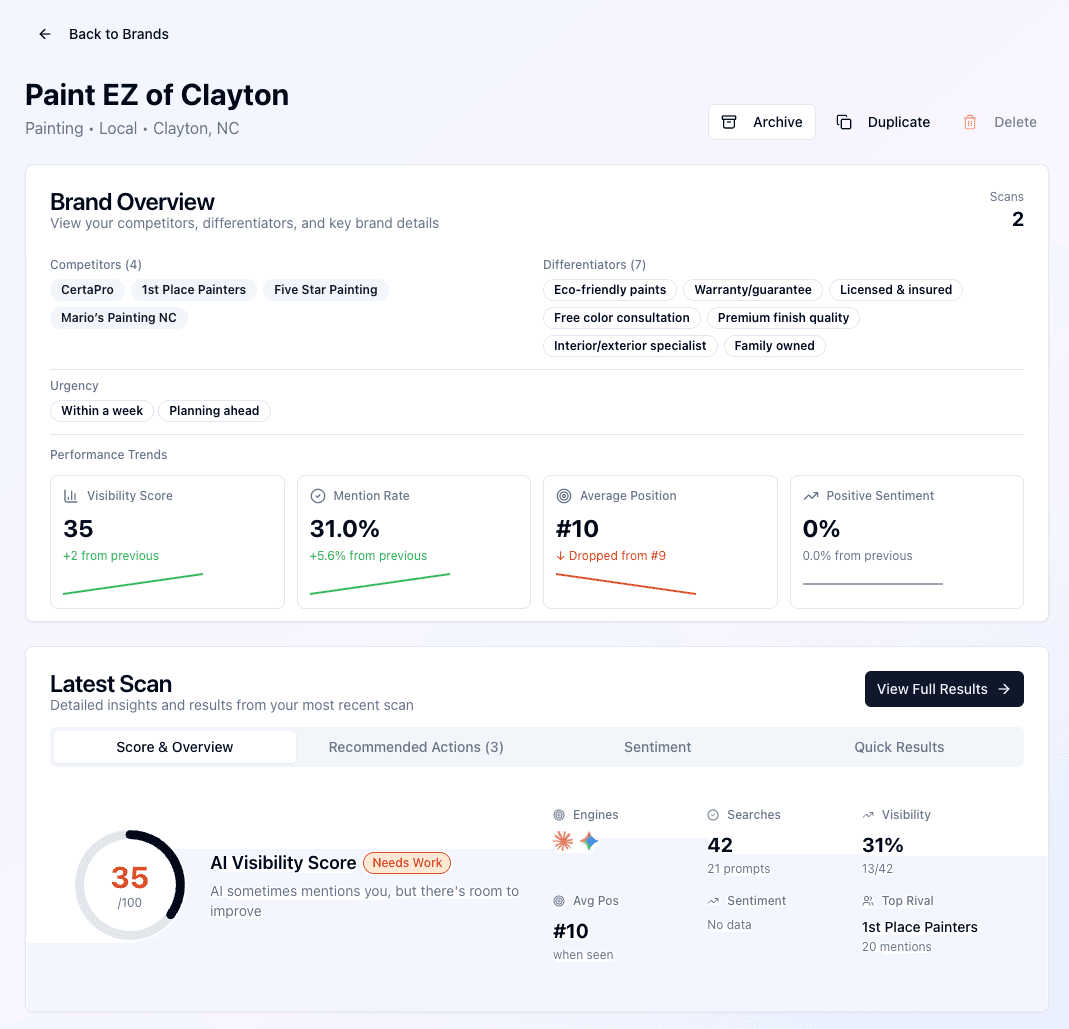 Visibility score trends showing changes over multiple scans
The Four Key Metrics
AI Biz Wiz tracks four metrics across your scan history. Each one tells you something different about your AI visibility.
1. AI Visibility Score
Your overall visibility score (0-100) is a composite metric that combines your mention rate, position, and sentiment into a single number.
How it's calculated: The score weights three factors:
- How often you're mentioned (mention rate)
- Where you appear when mentioned (position)
- Whether mentions are positive (sentiment)
What changes mean:
- Score going up = AI platforms are becoming more aware of your business
- Score going down = You may be losing visibility to competitors or outdated information
2. Brand Mention Rate
The percentage of queries where your business was mentioned in the AI response.
Example: If 15 out of 50 queries mentioned your business, your mention rate is 30%.
What changes mean:
- Rate going up = You're appearing in more relevant searches
- Rate going down = AI may be favoring competitors or generic answers
3. Average Position
When your business is mentioned, where do you typically appear in the list of recommendations? Lower numbers are better.
Example: An average position of #2 means you're typically the second business mentioned.
What changes mean:
- Position improving (lower number) = You're moving up in AI recommendations
- Position declining (higher number) = Competitors may be gaining prominence
4. Positive Sentiment Rate
The percentage of your mentions that were positive in tone.
Example: If 8 out of 10 mentions were positive, your positive sentiment rate is 80%.
What changes mean:
- Rate going up = AI is speaking more favorably about your business
- Rate going down = There may be negative information affecting perceptions
Reading the Trend Cards
Each metric is displayed as a card showing:
- Current value: Your score from the most recent scan
- Change indicator: How much the metric changed from your previous scan
- Direction arrow: Green up arrow for improvements, red down arrow for declines
For Average Position, the logic is inverted—a lower number is better, so moving from #4 to #2 shows a green improvement indicator.
Your Scan History
Below the trend metrics, you'll find a list of your previous scans (up to 12). Each entry shows:
- The scan date
- Which AI platforms were queried
- Number of queries tested
Click any scan to view its complete results. This lets you dig into the details of any point in your history to understand what was happening at that time.
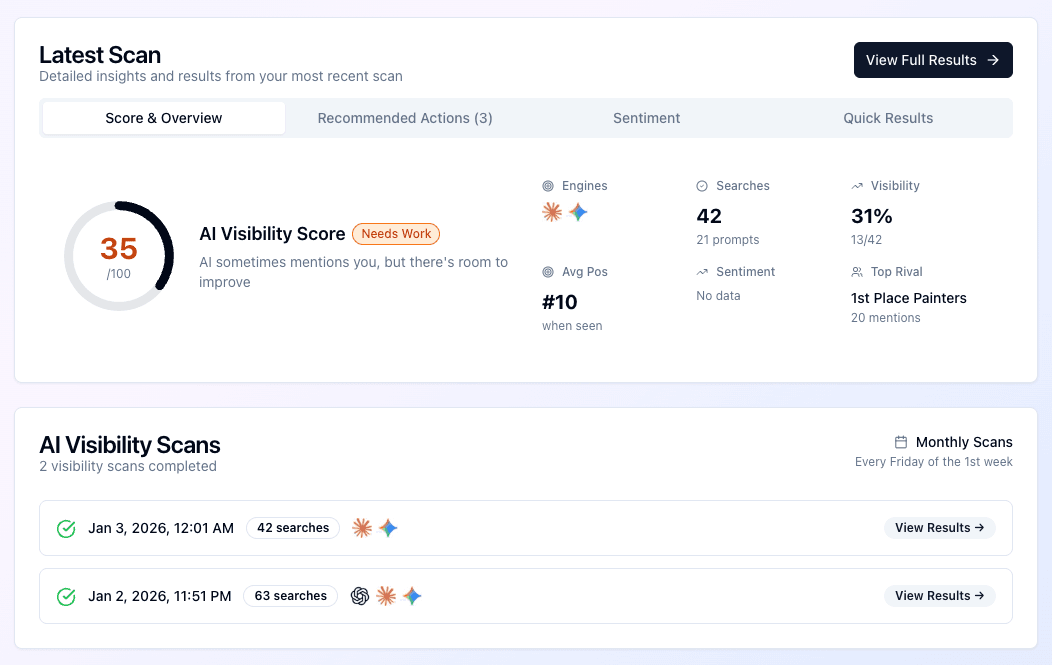 Score and history section showing detailed metrics
Interpreting Your Trends
Steady Improvement
If all four metrics are trending upward over several scans, your efforts to improve your online presence are working. Keep doing what you're doing.
Mixed Signals
Sometimes metrics move in different directions:
- High mention rate but low position = You're known, but not top-of-mind
- Good position but poor sentiment = You appear, but with caveats
- High sentiment but low mentions = When you're mentioned, it's positive—you just need more visibility
Sudden Changes
If you see a sudden spike or drop, consider:
- Did you recently update your website or business listings?
- Has there been press coverage (positive or negative)?
- Did a competitor make changes?
- Did an AI platform update its knowledge base?
What's Next?
Understanding trends helps you measure progress. Now learn how to dive deeper into one of the most actionable parts of your scan: differentiator coverage.
How AI Biz Wiz Works: Tutorial Series
- Creating Your First Brand
- Running a Visibility Scan
- Analyzing Scan Results
- Tracking Visibility Trends (You are here)
- Understanding Differentiator Coverage